Application Views Documentation
Overview
Pomp's Dispatch Center Application provides seven specialized views designed for different user roles and operational contexts. Each view is optimized for its target users' workflows, displaying relevant data elements and providing appropriate actions based on role permissions.
Platform Summary
| View | Platform | Technology | Target Users |
|---|---|---|---|
| Customer View | Web | Vue.js 3 + TypeScript | Customer Service Reps, Account Managers |
| Store View | Web | Vue.js 3 + TypeScript | Store Managers, Operations Staff |
| Billing View | Web | Vue.js 3 + TypeScript | Finance Team, Billing Clerks |
| Technician View | Mobile | React Native + TypeScript | Field Service Technicians |
| Dispatch View | Web | Vue.js 3 + TypeScript | Dispatchers, Operations Managers |
| Configuration View | Web | Vue.js 3 + TypeScript | System Administrators |
| Exception Management | Web | Vue.js 3 + TypeScript | Dispatchers, Operations Managers, System Administrators |
View Access By Role
| View | Admin | Dispatcher | Store Mgr | Technician | Billing | Cust Svc |
|---|---|---|---|---|---|---|
| Customer View | ✅ | ✅ | ✅ | ❌ | 👁️ | ✅ |
| Store View | ✅ | ✅ | ✅ | ❌ | 👁️ | 👁️ |
| Billing View | ✅ | 👁️ | 👁️ | ❌ | ✅ | 👁️ |
| Technician View | ❌ | ❌ | ❌ | ✅ | ❌ | ❌ |
| Dispatch View | ✅ | ✅ | 👁️ | ❌ | ❌ | ❌ |
| Configuration | ✅ | ❌ | 👁️ | ❌ | ❌ | ❌ |
| Exception Mgmt | ✅ | ✅ | 👁️ | ❌ | ❌ | ❌ |
✅ = Full Access 👁️ = Read-Only ❌ = No Access
Table of Contents
- Navigation Architecture
- Customer View
- Store View
- Billing View
- Technician View
- Dispatch View
- Configuration View
- Exception Management View
- Forms Builder
- Shared Components
- UI/UX Standards
- Data Refresh & Real-Time Updates
- Accessibility Requirements
Navigation Architecture
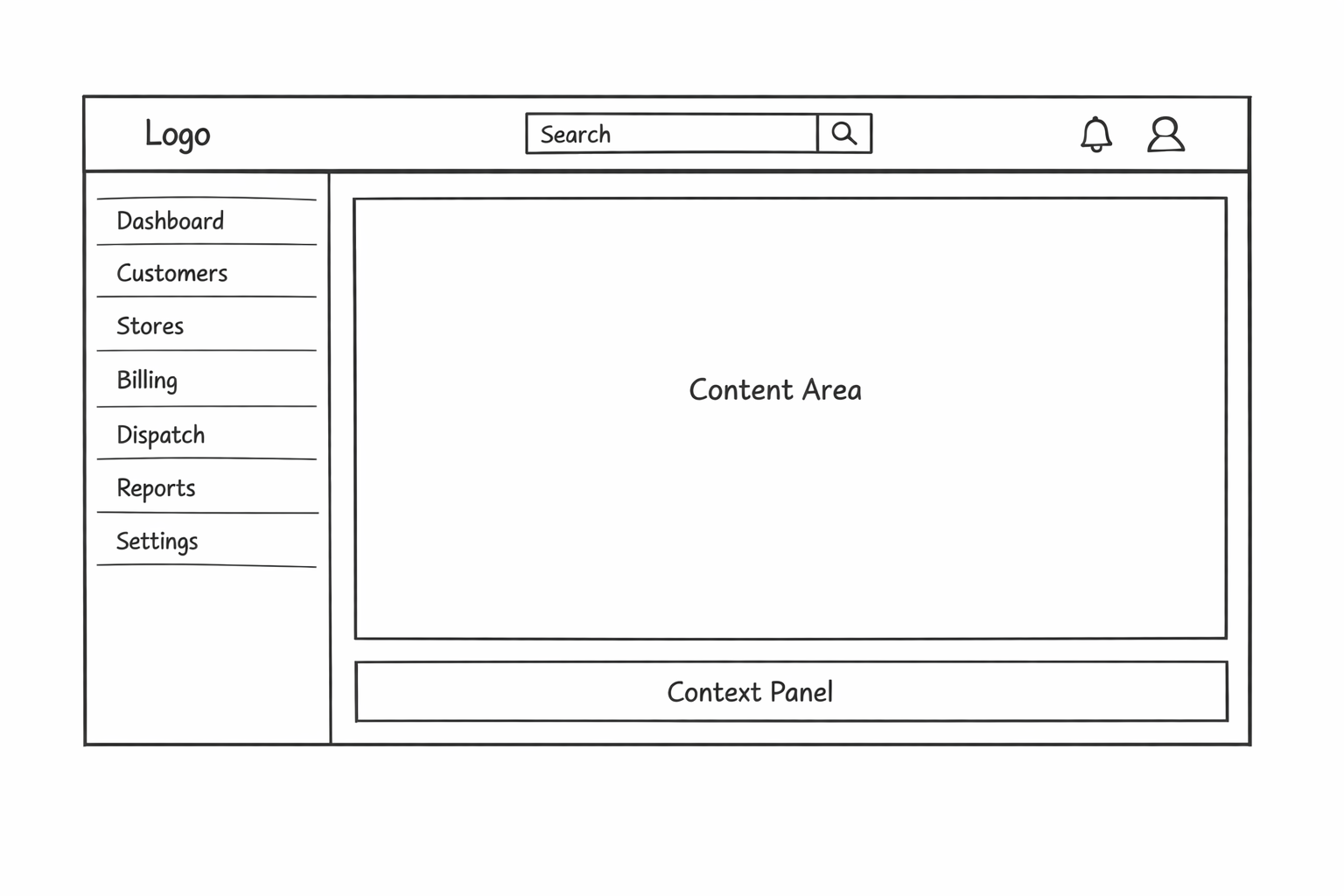
Web Application Navigation Structure
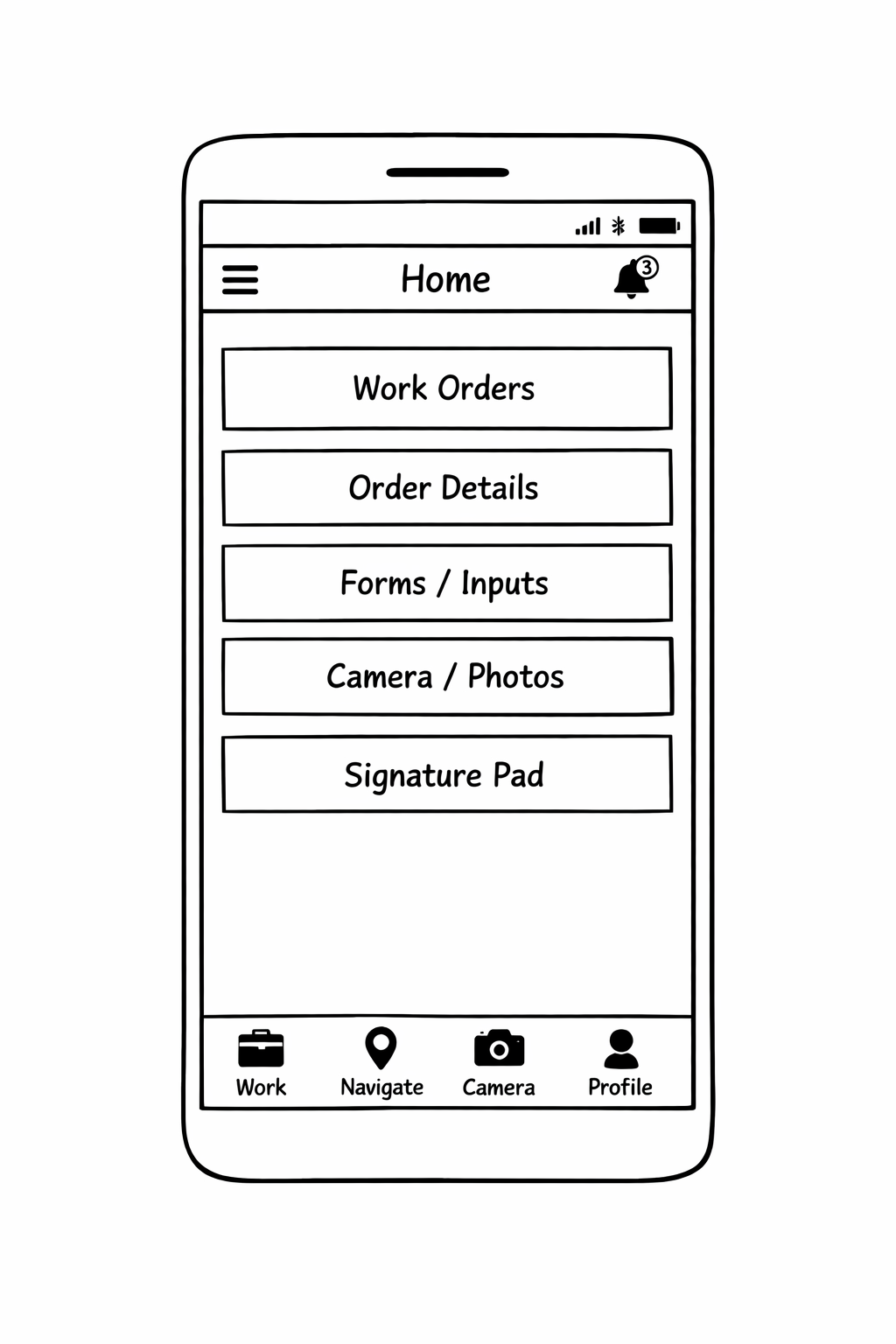
Mobile Application Navigation Structure (Technician View)
Customer View
Purpose
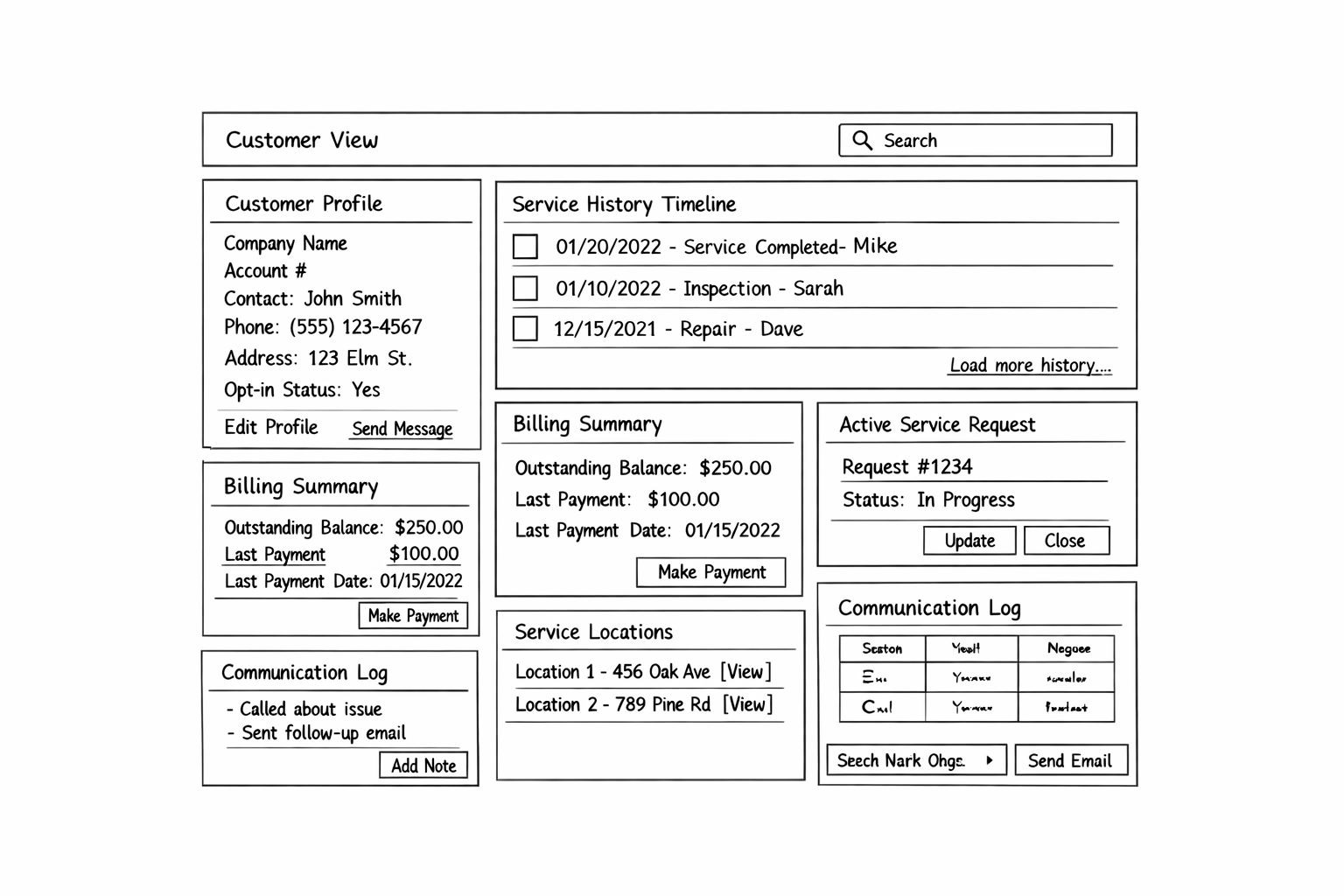
The Customer View provides a comprehensive interface for managing customer relationships, viewing service history, and coordinating service requests. It serves as the primary interface for customer-facing staff to access all customer-related information.
Target Users
- Customer Service Representatives - Handle inbound customer calls and inquiries
- Account Managers - Manage customer relationships and service agreements
Platform & Technology
- Platform: Web Application
- Framework: Vue.js 3 with Composition API
- Language: TypeScript
- Styling: Tailwind CSS
Layout Overview
Data Elements Displayed
| Section | Data Elements | Source System | Refresh Rate |
|---|---|---|---|
| Customer Profile | Account number, company name, primary contact, phone, email, address | MaddenCo (SoT) | On-demand |
| Service Locations | Multiple addresses associated with customer | MaddenCo / Pomp's DB | On-demand |
| Notification Preferences | SMS opt-in status, email preferences, web notification settings | Pomp's DB | On-demand |
| Service History | Past work orders, dates, technicians, status, service types | Pomp's DB, REACH | 5 minutes |
| Active Service Requests | Open/pending work orders, priority, assigned tech, ETA | Pomp's DB | Real-time (WebSocket) |
| Billing Summary | Outstanding balance, last payment, due dates | MaddenCo (SoT) | 15 minutes |
| Communication Log | Calls, emails, notes with timestamps and authors | Pomp's DB | On-demand |
Key Actions
| Action | Description | Required Permission |
|---|---|---|
| Create Service Request | Submit new work order for customer | service_requests.create |
| Edit Customer Profile | Update contact information, addresses | customers.update |
| View Invoices | Access billing history and invoice details | invoices.view |
| Send Communication | Email or log phone call to customer | customer_communication.send |
| Update Notification Preferences | Change SMS opt-in, email preferences | customers.update |
| Add Service Location | Register additional customer addresses | customers.update |
Vue.js Component Structure
src/views/customer/
├── CustomerView.vue              # Main view container
├── components/
│   ├── CustomerProfile.vue       # Profile card component
│   ├── CustomerSearch.vue        # Search/filter component
│   ├── ServiceHistory.vue        # Timeline of past services
│   ├── ActiveRequests.vue        # Current work orders panel
│   ├── BillingSummary.vue        # Financial summary card
│   ├── CommunicationLog.vue      # Interaction history
│   ├── ServiceLocations.vue      # Address management
│   └── NotificationPrefs.vue     # Notification settings
├── composables/
│   ├── useCustomer.ts            # Customer data fetching
│   ├── useServiceHistory.ts      # Service history logic
│   └── useCommunication.ts       # Communication actions
└── types/
    └── customer.types.ts         # TypeScript interfaces
Store View
Purpose
The Store View provides location-specific operational oversight, enabling Store Managers to monitor work orders, track technician performance, and manage store-level operations for their assigned location(s).
Target Users
- Store Managers - Single-store oversight and local operations
- Regional Managers - Multi-store access with store switcher
- Operations Staff - Day-to-day operational monitoring
Platform & Technology
- Platform: Web Application
- Framework: Vue.js 3 with Composition API
- Language: TypeScript
- Styling: Tailwind CSS
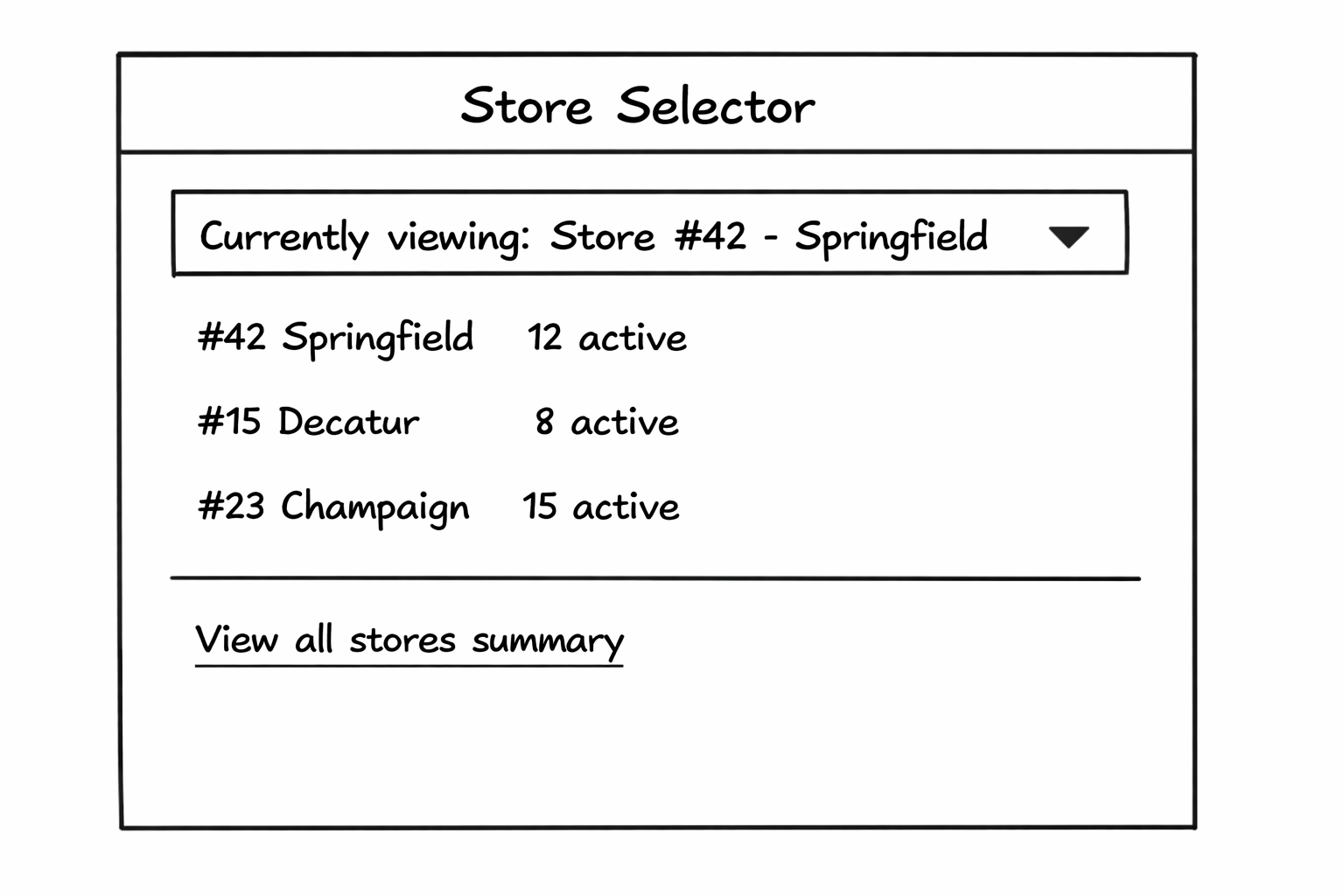
Layout Overview
Data Elements Displayed
| Section | Data Elements | Source System | Refresh Rate |
|---|---|---|---|
| Store Dashboard | Active orders, completed today, pending assignment, SLA % | Pomp's DB | Real-time |
| Technician Roster | Name, status, current assignment, location, ETA | Pomp's DB, GeoTab | Real-time (30s) |
| Active Work Orders | Work order #, customer, service type, tech, status, priority | Pomp's DB | Real-time (WebSocket) |
| Alert Queue | Unacknowledged alerts for this store, escalations | Pomp's DB | Real-time |
| Store Performance | Completion rate, response time, satisfaction, revenue | Pomp's DB, MaddenCo | 15 minutes |
| Inventory Levels | Parts stock at location, low stock alerts | MaddenCo | Hourly |
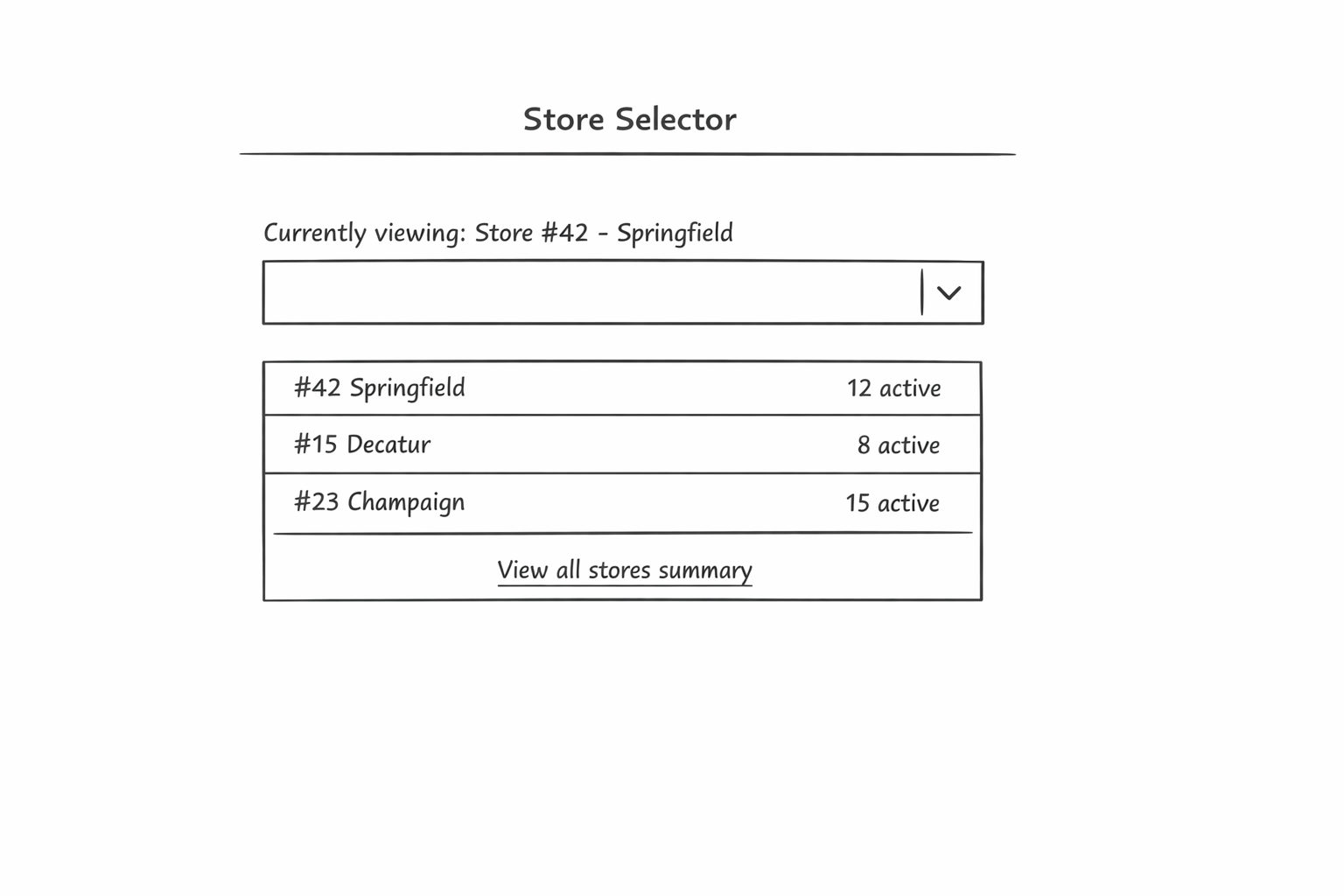
Multi-Store Capability
For users with multi-store access (Regional Managers, Area Dispatchers):
Key Actions
| Action | Description | Required Permission |
|---|---|---|
| View Work Orders | Access all work orders for the store | work_orders.view |
| Approve Work Order | Approve pending work order requests | work_orders.approve |
| View Technician Location | See real-time GPS location on map | technician_location.view |
| Acknowledge Alert | Mark store alert as acknowledged | alerts.acknowledge |
| View Store Reports | Access store performance metrics | reporting.store |
| Manage Local Inventory | View and update parts inventory | inventory.view |
Vue.js Component Structure
src/views/store/
├── StoreView.vue                 # Main view container
├── components/
│   ├── StoreDashboard.vue        # KPI metrics cards
│   ├── StoreSelector.vue         # Multi-store dropdown
│   ├── TechnicianRoster.vue      # Tech list with status
│   ├── TechnicianMap.vue         # GeoTab GPS integration
│   ├── ActiveWorkOrders.vue      # Work order list
│   ├── AlertQueue.vue            # Store alerts panel
│   ├── StorePerformance.vue      # Performance metrics
│   └── InventoryLevels.vue       # Parts inventory
├── composables/
│   ├── useStore.ts               # Store data fetching
│   ├── useTechnicians.ts         # Technician roster logic
│   └── useStoreAlerts.ts         # Alert management
└── types/
    └── store.types.ts            # TypeScript interfaces
Billing View
Purpose
The Billing View provides comprehensive invoice management, payment processing, and financial reporting capabilities. It serves as the primary interface for the finance team to manage the billing lifecycle from work order completion to payment collection.
Target Users
- Billing Clerks - Daily invoice processing and payment management
- Finance Team - Financial reporting and reconciliation
- Accounts Receivable - Collections and payment tracking
Platform & Technology
- Platform: Web Application
- Framework: Vue.js 3 with Composition API
- Language: TypeScript
- Styling: Tailwind CSS
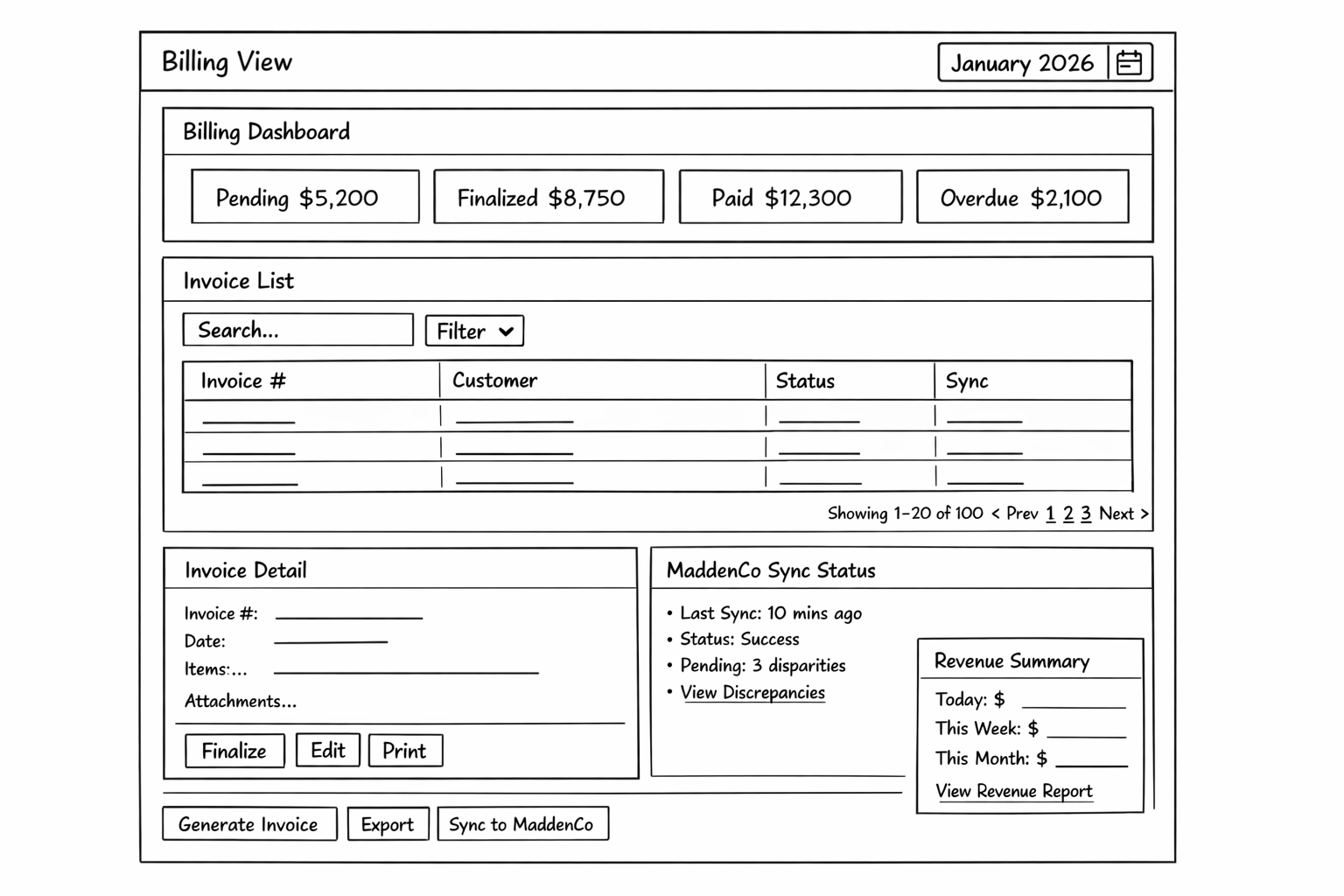
Layout Overview
Data Elements Displayed
| Section | Data Elements | Source System | Refresh Rate |
|---|---|---|---|
| Billing Dashboard | Invoice counts by status, amounts | Pomp's DB | 5 minutes |
| Invoice List | Invoice #, customer, amount, status, sync status | Pomp's DB | On-demand |
| Invoice Detail | Line items (labor, parts, fees), tax, total, attachments, signature | Pomp's DB | On-demand |
| MaddenCo Sync Status | Last sync time, pending count, discrepancies | MaddenCo Proxy | 5 minutes |
| Revenue Summary | Daily, weekly, monthly revenue totals | Pomp's DB, MaddenCo | 15 minutes |
| Customer Billing Info | Payment terms, credit limit, billing address | MaddenCo (SoT) | On-demand |
Invoice Workflow States
flowchart LR
    draft["Draft
    Created from WO"]
    pending["Pending Review
    Awaiting approval"]
    finalized["Finalized
    Sent to MaddenCo"]
    paid["Paid
    Payment received"]

    draft --> pending
    pending --> finalized
    finalized --> paid
Key Actions
| Action | Description | Required Permission |
|---|---|---|
| Generate Invoice | Create invoice from completed work order | invoices.create |
| Edit Invoice | Modify draft/pending invoices | invoices.update |
| Finalize Invoice | Mark invoice as ready for billing | invoices.finalize |
| Process Payment | Record customer payment | payments.process |
| Sync to MaddenCo | Push invoice to MaddenCo ERP | invoices.sync |
| Export Invoices | Download invoice data/reports | invoices.export |
| View Revenue Reports | Access financial analytics | reporting.billing |
Vue.js Component Structure
src/views/billing/
├── BillingView.vue               # Main view container
├── components/
│   ├── BillingDashboard.vue      # KPI metrics cards
│   ├── InvoiceList.vue           # Invoice table with filters
│   ├── InvoiceDetail.vue         # Invoice detail panel
│   ├── InvoiceLineItems.vue      # Line item breakdown
│   ├── PaymentForm.vue           # Payment processing form
│   ├── MaddenCoSync.vue          # Sync status panel
│   ├── RevenueSummary.vue        # Revenue metrics
│   └── InvoiceGenerator.vue      # Create from work order
├── composables/
│   ├── useInvoices.ts            # Invoice data fetching
│   ├── usePayments.ts            # Payment processing
│   └── useMaddenCoSync.ts        # MaddenCo integration
└── types/
    └── billing.types.ts          # TypeScript interfaces
Technician View
Purpose
The Technician View is a mobile-first application designed for field service technicians to manage their daily work orders, update job status, capture documentation, and synchronize data with the central system. It operates with an offline-first architecture to ensure functionality in areas with limited connectivity.
Target Users
- Field Service Technicians - Primary daily users for work execution
Platform & Technology
- Platform: Mobile Application (iOS & Android)
- Framework: React Native with TypeScript
- State Management: Redux Toolkit / Zustand
- Local Storage: SQLite (react-native-sqlite-storage)
- Offline Sync: Background sync with conflict resolution
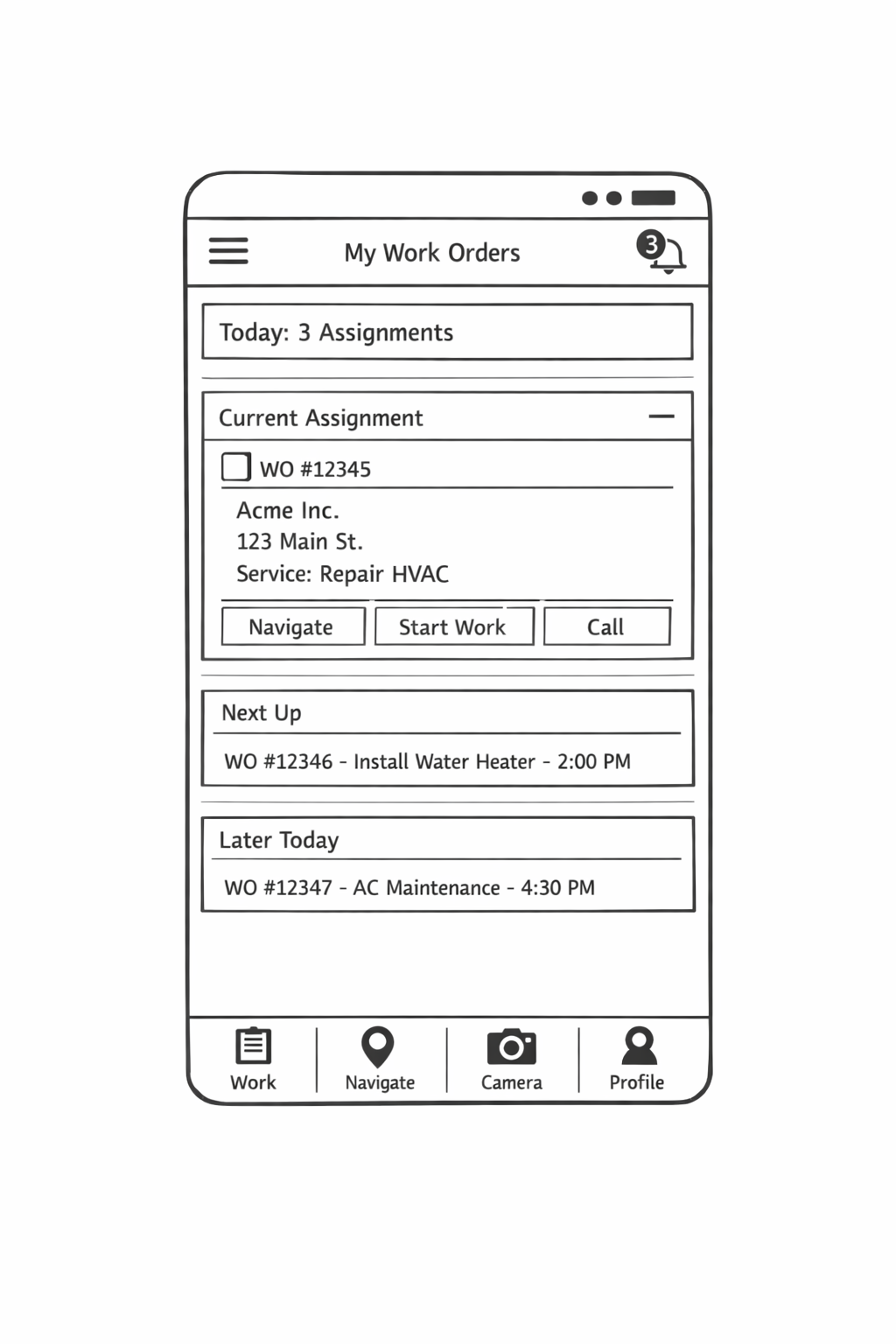
Layout Overview
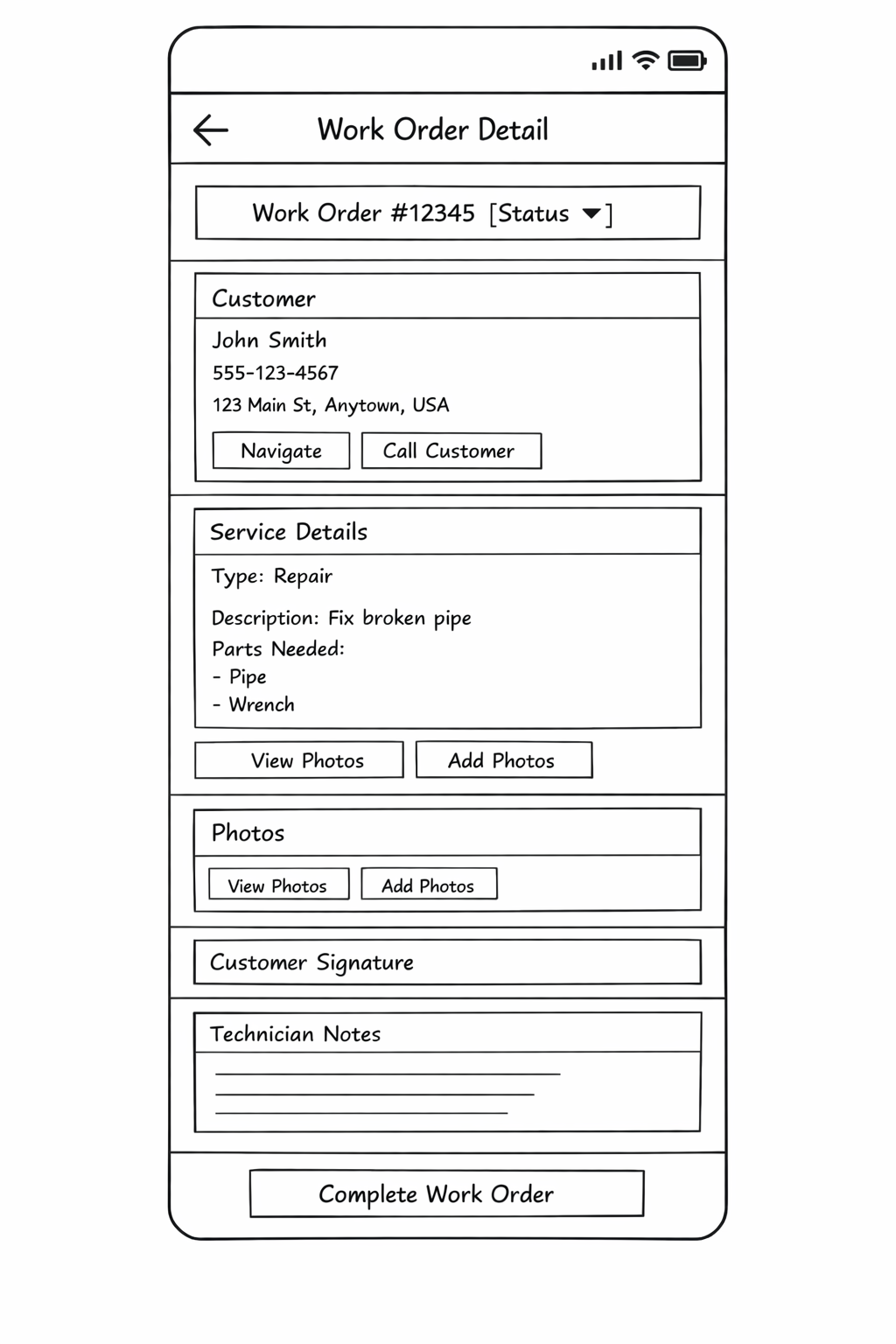
Work Order Detail Screen
Data Elements Displayed
| Section | Data Elements | Source | Offline Available |
|---|---|---|---|
| Work Order List | WO#, customer, address, time, service type, priority | Pomp's DB → SQLite | ✅ Yes |
| Work Order Detail | Full service description, parts list, notes | Pomp's DB → SQLite | ✅ Yes |
| Customer Info | Name, contact, phone, address | Pomp's DB → SQLite | ✅ Yes |
| Status Updates | Current status, status history | Pomp's DB → SQLite | ✅ Yes (queued) |
| Photos | Before/after photos, timestamps | Local → Azure Blob | ✅ Yes (queued) |
| Signature | Customer signature capture | Local → Pomp's DB | ✅ Yes (queued) |
| GPS Location | Current position, route to customer | GeoTab / Device GPS | ✅ Yes |
| Time Tracking | Clock in/out, travel time, work time | Local → Pomp's DB | ✅ Yes (queued) |
Offline-First Architecture
flowchart TB
    mobile["Mobile
    UI"]
    sqlite["SQLite
    Local DB"]
    sync["Sync
    Service"]
    network["Network Check
    (Connectivity)"]
    online["ONLINE
    • Sync now
    • Push changes
    • Pull updates"]
    offline["OFFLINE
    • Queue ops
    • Store local
    • Retry later"]
    api["Pomp's API
    (Azure)"]

    mobile <--> sqlite
    sqlite <--> sync
    sync --> network
    network --> online
    network --> offline
    online --> api
Technician Status Workflow
flowchart LR
    available[Available]
    assigned[Assigned]
    enroute[En Route]
    arrived[Arrived]
    inprogress[In Progress]
    complete[Complete]

    available --> assigned
    assigned --> enroute
    enroute --> arrived
    arrived --> inprogress
    inprogress --> complete
Key Actions
| Action | Description | Offline Support |
|---|---|---|
| Update Status | Change work order status | ✅ Queued |
| Navigate | Open maps to customer location | ✅ Cached maps |
| Call Customer | Initiate phone call | ❌ Requires network |
| Capture Photo | Take before/after photos | ✅ Stored locally |
| Scan Barcode | Scan parts for inventory | ✅ Local lookup |
| Collect Signature | Digital signature capture | ✅ Stored locally |
| Add Notes | Technician notes and comments | ✅ Stored locally |
| Complete Work Order | Submit completed work | ✅ Queued |
| Clock In/Out | Time tracking | ✅ Stored locally |
React Native Component Structure
src/
├── screens/
│   ├── WorkOrderListScreen.tsx     # Daily assignment list
│   ├── WorkOrderDetailScreen.tsx   # Full work order details
│   ├── NavigationScreen.tsx        # Maps integration
│   ├── CameraScreen.tsx            # Photo capture
│   ├── SignatureScreen.tsx         # Signature pad
│   └── ProfileScreen.tsx           # Technician profile
├── components/
│   ├── WorkOrderCard.tsx           # Work order summary card
│   ├── StatusSelector.tsx          # Status dropdown
│   ├── PhotoCapture.tsx            # Camera component
│   ├── SignaturePad.tsx            # Signature component
│   ├── PartsChecklist.tsx          # Parts verification
│   ├── OfflineIndicator.tsx        # Network status
│   └── SyncStatus.tsx              # Sync queue status
├── services/
│   ├── syncService.ts              # Background sync logic
│   ├── offlineStorage.ts           # SQLite operations
│   ├── locationService.ts          # GPS tracking
│   └── apiService.ts               # API client
├── hooks/
│   ├── useWorkOrders.ts            # Work order state
│   ├── useOfflineSync.ts           # Sync management
│   └── useLocation.ts              # GPS hooks
└── types/
    └── workOrder.types.ts          # TypeScript interfaces
Dispatch View
Purpose
The Dispatch View is the central command center for real-time dispatch operations. It provides dispatchers with a comprehensive view of all work orders, technician locations, and resources to efficiently assign and manage field service operations across 200+ stores.
Target Users
- Dispatchers - Real-time work order assignment and coordination
- Operations Managers - Oversight and performance monitoring
- Central Dispatch Team - Multi-region coordination
Platform & Technology
- Platform: Web Application
- Framework: Vue.js 3 with Composition API
- Language: TypeScript
- Styling: Tailwind CSS
- Real-time: WebSocket connections for live updates
- Maps: Integration with mapping service for technician locations
Layout Overview
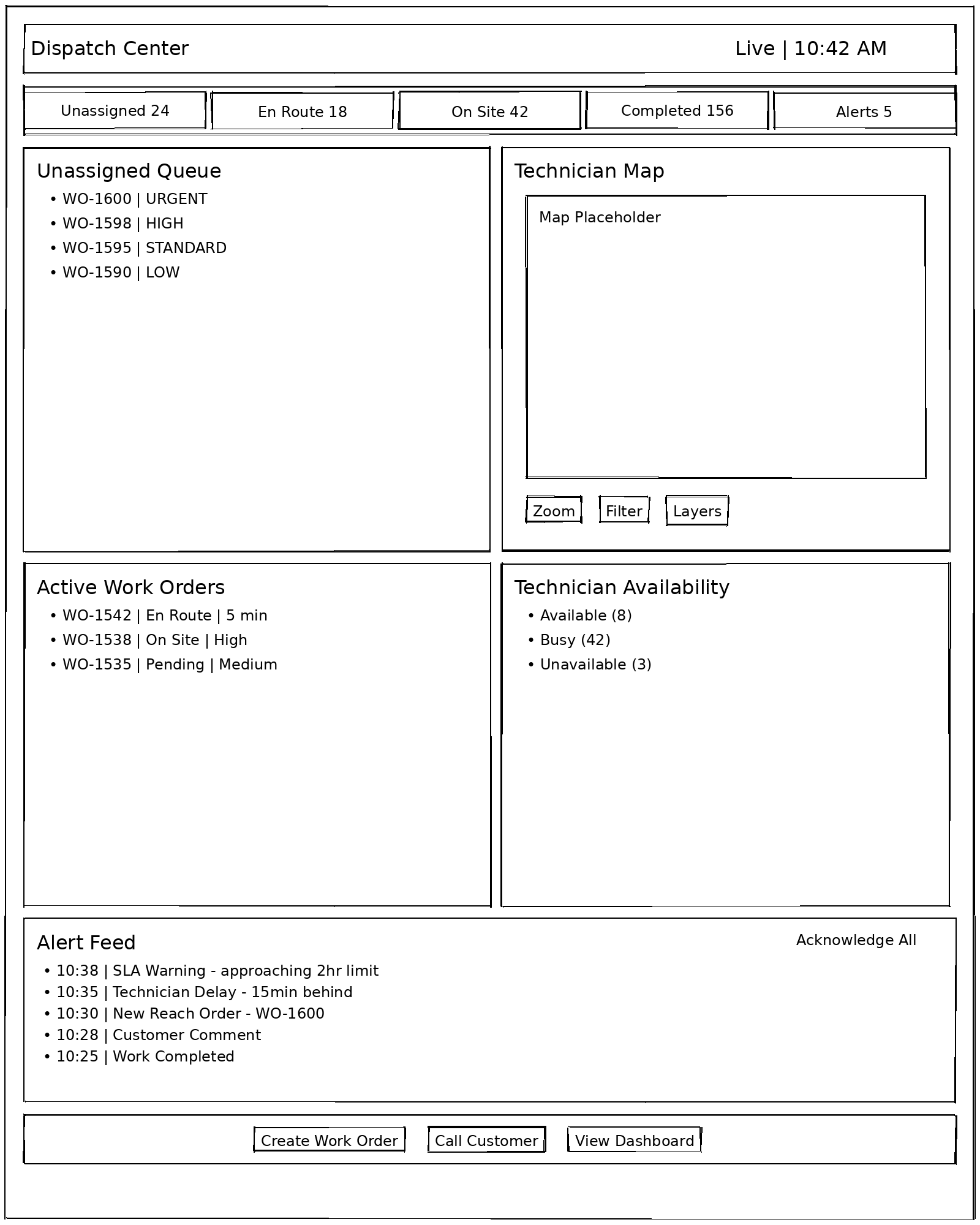
Data Elements Displayed
| Section | Data Elements | Source System | Refresh Rate |
|---|---|---|---|
| Status Summary | Counts by status (unassigned, en route, on site, completed, alerts) | Pomp's DB | Real-time (WebSocket) |
| Unassigned Queue | Work orders awaiting assignment, priority, customer, location, age | Pomp's DB, REACH | Real-time |
| Technician Map | Real-time GPS locations, route to customer, geofences | GeoTab | 30 seconds |
| Technician Availability | Status (available, busy, unavailable), current assignment, skills | Pomp's DB, Dayforce | Real-time |
| Active Work Orders | In-progress work, tech assignment, status, ETA, customer | Pomp's DB | Real-time |
| Alert Feed | SLA warnings, delays, new orders, comments, completions | Pomp's DB | Real-time |
| REACH Inbound | New work orders from REACH portal | REACH Proxy | 30 seconds (polling) |
Assignment Workflow
flowchart TB
    unassigned[Unassigned Work Order]
    assign[Assign Technician]
    notified[Technician Notified]
    suggestions["Smart Suggestions
    • Proximity
    • Skills
    • Workload
    • Schedule"]
    push["Push Notification + SMS
    (Genesys)"]
    customer["Customer Notified
    (ETA)"]
    reach["REACH Updated
    (if source)"]

    unassigned --> assign
    assign --> notified
    assign --> suggestions
    notified --> push
    push --> customer
    customer --> reach
Key Actions
| Action | Description | Required Permission |
|---|---|---|
| Assign Technician | Assign tech to unassigned work order | technician_assignment.create |
| Reassign Work Order | Change technician assignment | technician_assignment.update |
| Create Work Order | Create new service request | service_requests.create |
| View Technician Details | See tech skills, schedule, history | technicians.view |
| Contact Customer | Initiate call or send notification | customer_communication.send |
| Acknowledge Alert | Mark alert as seen | alerts.acknowledge |
| View Live Map | Access real-time technician locations | technician_location.view |
| Send Customer ETA | Notify customer of technician ETA | customer_communication.send |
Real-Time Features
| Feature | Technology | Update Frequency |
|---|---|---|
| Work Order Status | WebSocket (SignalR) | Instant |
| Technician Location | GeoTab API + WebSocket | 30 seconds |
| Alert Feed | WebSocket (SignalR) | Instant |
| Unassigned Queue | WebSocket + REACH Polling | Instant / 30 sec |
| Dashboard Metrics | WebSocket | 5 seconds |
Vue.js Component Structure
src/views/dispatch/
├── DispatchView.vue              # Main view container
├── components/
│   ├── DispatchDashboard.vue     # Status summary cards
│   ├── UnassignedQueue.vue       # Work order queue
│   ├── TechnicianMap.vue         # GeoTab map integration
│   ├── TechnicianList.vue        # Available/busy tech list
│   ├── ActiveWorkOrders.vue      # In-progress work panel
│   ├── AlertFeed.vue             # Real-time alert stream
│   ├── AssignmentModal.vue       # Tech assignment dialog
│   ├── WorkOrderCard.vue         # Work order summary
│   └── SmartSuggestions.vue      # AI-powered tech suggestions
├── composables/
│   ├── useDispatch.ts            # Dispatch state management
│   ├── useRealTimeUpdates.ts     # WebSocket subscriptions
│   ├── useTechnicianMap.ts       # Map integration
│   └── useAlerts.ts              # Alert management
└── types/
    └── dispatch.types.ts         # TypeScript interfaces
Shared Components
Header Component

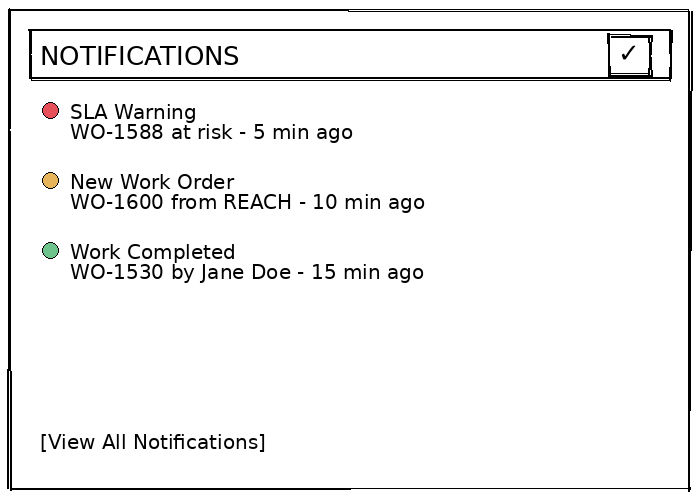
Elements: - Logo/branding - Global search (customers, work orders, invoices) - Notification bell with unread count - User avatar with dropdown menu (profile, settings, logout)
Sidebar Navigation
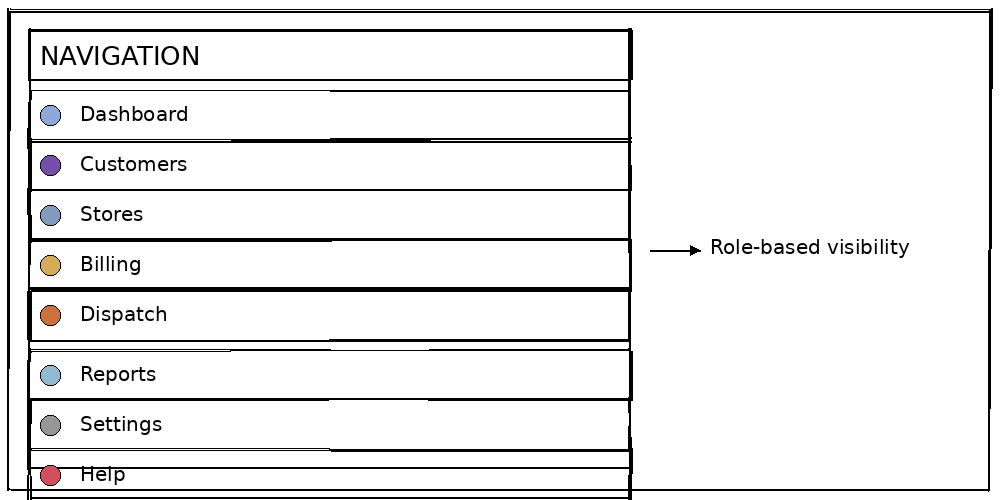
Features: - Role-based menu visibility - Collapsible for more screen space - Active state highlighting - Badge counts for pending items
Notification Panel
UI/UX Standards
Design System
| Element | Standard | Implementation |
|---|---|---|
| Colors | Pomp's brand palette | Tailwind CSS config |
| Typography | Inter font family | 14px base, 1.5 line height |
| Spacing | 4px base unit | Tailwind spacing scale |
| Border Radius | 8px default | Tailwind rounded-lg |
| Shadows | Subtle elevation | Tailwind shadow-sm/md |
| Icons | Heroicons | Consistent icon set |
Responsive Breakpoints
| Breakpoint | Width | Target Devices |
|---|---|---|
sm |
640px | Mobile phones |
md |
768px | Tablets |
lg |
1024px | Small laptops |
xl |
1280px | Desktops |
2xl |
1536px | Large monitors |
Loading States
- Skeleton loaders for content areas
- Spinner for actions/buttons
- Progress bars for uploads
- Toast notifications for feedback
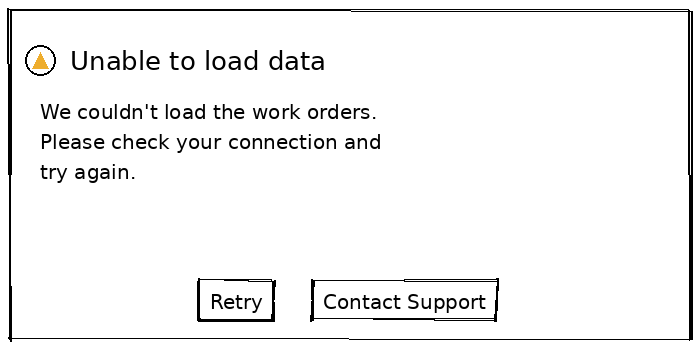
Error States
Data Refresh & Real-Time Updates
Refresh Strategy by View
| View | Primary Refresh | Secondary Refresh | Real-Time Events |
|---|---|---|---|
| Customer View | On-demand | 5 min polling | Active request updates |
| Store View | Real-time | 30 sec map refresh | Work order status, alerts |
| Billing View | On-demand | 15 min polling | Payment confirmations |
| Technician View | Background sync | On network change | Push notifications |
| Dispatch View | Real-time (WebSocket) | 30 sec REACH poll | All dispatch events |
WebSocket Events
| Event | Payload | Subscribers |
|---|---|---|
workorder.created |
Work order details | Dispatch View, Store View |
workorder.updated |
Status, assignment changes | All views |
technician.status |
Tech ID, new status, location | Dispatch View, Store View |
alert.created |
Alert details | Dispatch View, Store View |
payment.received |
Payment details | Billing View |
reach.neworder |
REACH work order | Dispatch View |
Conflict Resolution
For offline-capable views (Technician View):
| Conflict Type | Resolution Strategy |
|---|---|
| Status Update | Last-write-wins with timestamp |
| Photo Upload | Merge (add all photos) |
| Notes/Comments | Merge (append all) |
| Work Order Reassignment | Server wins, notify technician |
Accessibility Requirements
WCAG 2.1 AA Compliance
| Requirement | Implementation |
|---|---|
| Color Contrast | 4.5:1 minimum for text |
| Keyboard Navigation | All actions accessible via keyboard |
| Focus Indicators | Visible focus rings on all interactive elements |
| Screen Reader | ARIA labels and landmarks |
| Font Scaling | Support up to 200% zoom |
| Motion | Respect prefers-reduced-motion |
Keyboard Shortcuts (Web Views)
| Shortcut | Action |
|---|---|
Ctrl + K |
Global search |
Ctrl + N |
Create new work order |
Ctrl + / |
Keyboard shortcut help |
Esc |
Close modal/panel |
Tab |
Navigate forward |
Shift + Tab |
Navigate backward |
Configuration View
Purpose
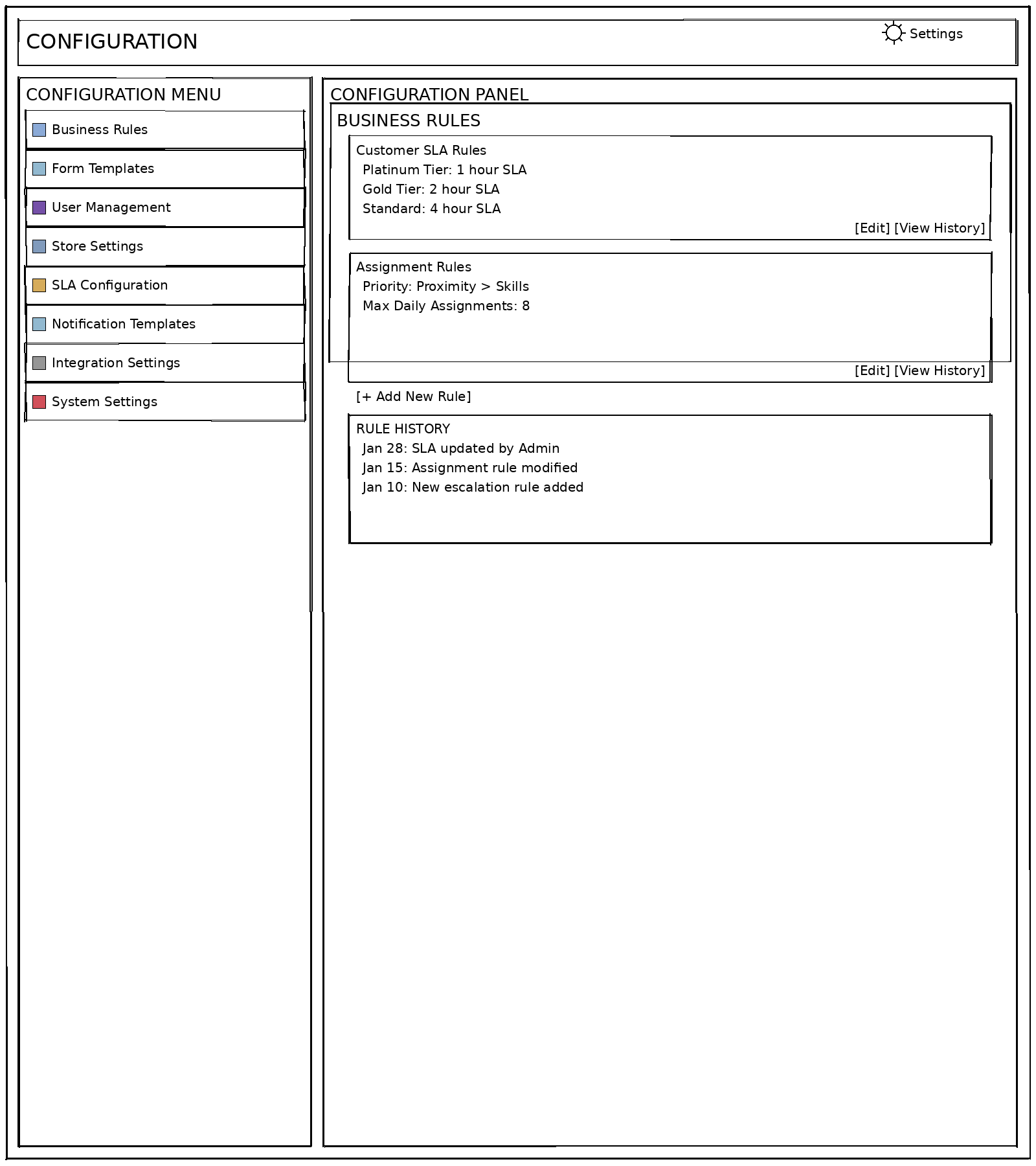
The Configuration View provides system administrators with a centralized interface for managing application settings, business rules, form templates, user accounts, and integration configurations. This view enables non-developer modification of system behavior without code changes.
Target Users
- System Administrators - Full configuration access
- Store Managers - Read-only access to store-specific settings
Platform & Technology
- Platform: Web Application
- Framework: Vue.js 3 with Composition API
- Language: TypeScript
- Styling: Tailwind CSS
Layout Overview
Configuration Sections
| Section | Description | Data Source |
|---|---|---|
| Business Rules | SLA definitions, assignment logic, escalation rules | Azure SQL + Rules Engine |
| Form Templates | Dynamic form definitions for work orders | Azure SQL |
| User Management | User accounts, role assignments, permissions | Azure AD + Pomp's DB |
| Store Settings | Store-specific configurations, service areas | Azure SQL |
| SLA Configuration | Customer tier SLAs, response time targets | Azure SQL |
| Notification Templates | SMS, email, push notification templates | Azure SQL |
| Integration Settings | API endpoints, sync schedules, credentials | Azure Key Vault + SQL |
| System Settings | Application-wide settings, feature flags | Azure SQL |
Key Actions
| Action | Description | Required Permission |
|---|---|---|
| Edit Business Rules | Modify rule definitions | configuration.rules.update |
| Create Form Template | Design new dynamic forms | configuration.forms.create |
| Manage Users | Create/edit user accounts, assign roles | users.manage |
| Configure SLAs | Define SLA thresholds by customer tier | configuration.sla.update |
| Edit Notification Templates | Modify message templates | configuration.notifications.update |
| View Audit History | See configuration change history | configuration.audit.view |
Vue.js Component Structure
src/views/configuration/
├── ConfigurationView.vue           # Main view container
├── components/
│   ├── ConfigurationMenu.vue       # Left navigation menu
│   ├── BusinessRulesPanel.vue      # Rules editor
│   ├── RuleEditor.vue              # Individual rule editor
│   ├── FormTemplatesPanel.vue      # Form template list
│   ├── FormDesigner.vue            # Visual form builder
│   ├── UserManagementPanel.vue     # User list and editor
│   ├── StoreSettingsPanel.vue      # Store configuration
│   ├── SLAConfigPanel.vue          # SLA definitions
│   ├── NotificationTemplates.vue   # Template editor
│   ├── IntegrationSettings.vue     # API configurations
│   └── AuditHistory.vue            # Change log viewer
├── composables/
│   ├── useConfiguration.ts         # Configuration state
│   ├── useBusinessRules.ts         # Rules management
│   └── useAuditHistory.ts          # Audit log queries
└── types/
    └── configuration.types.ts      # TypeScript interfaces
Exception Management View
Purpose
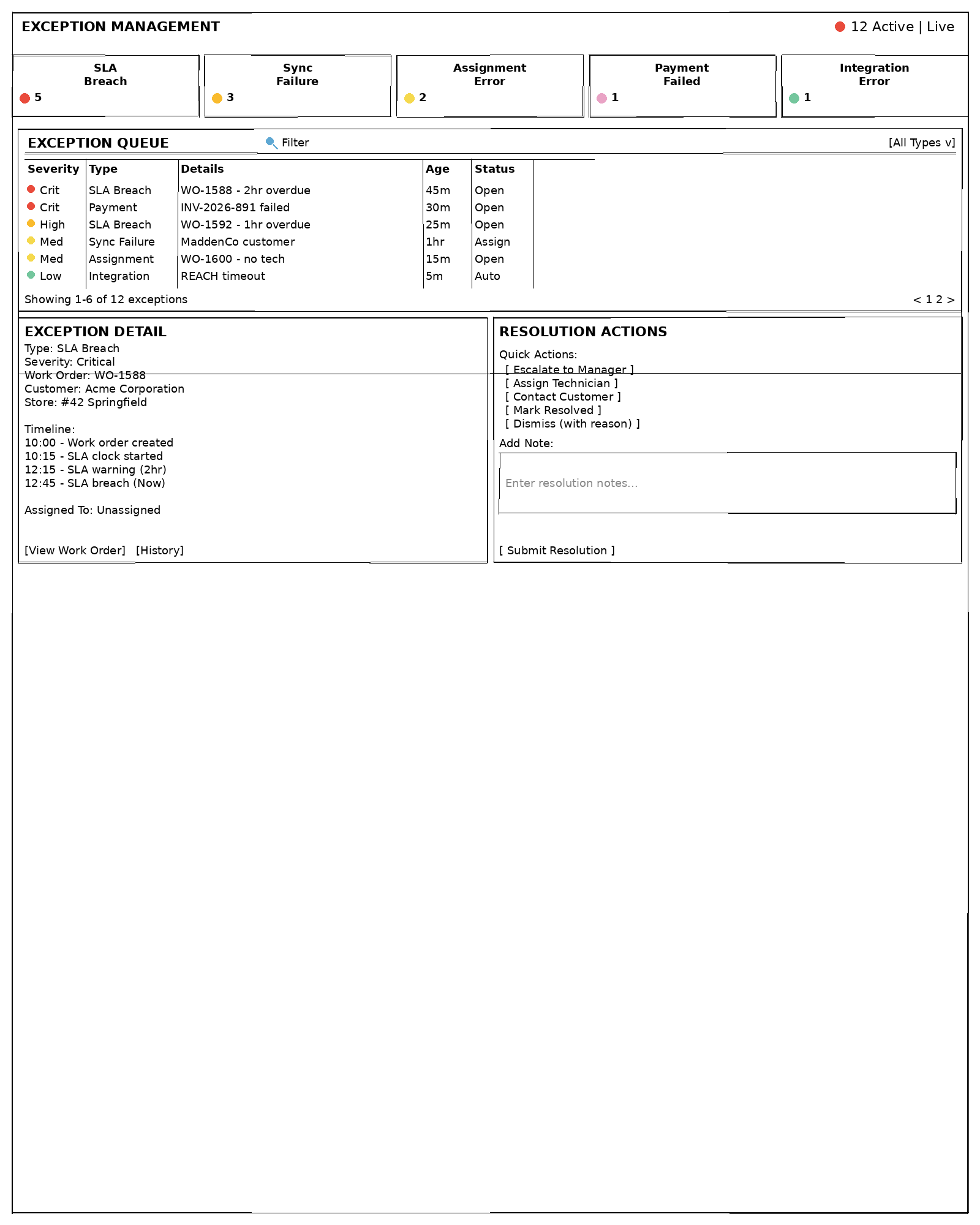
The Exception Management View provides a centralized interface for identifying, tracking, and resolving operational exceptions such as SLA breaches, sync failures, assignment errors, and integration issues. It enables proactive exception handling with configurable escalation workflows.
Target Users
- Dispatchers - Handle dispatch-related exceptions
- Operations Managers - Oversight and escalation
- System Administrators - Technical exception resolution
Platform & Technology
- Platform: Web Application
- Framework: Vue.js 3 with Composition API
- Language: TypeScript
- Styling: Tailwind CSS
- Real-time: WebSocket (SignalR) for live exception feed
Layout Overview
Exception Types
| Type | Severity | Description | Auto-Resolution |
|---|---|---|---|
| SLA Breach | Critical/High | Work order exceeds SLA threshold | No - Manual |
| Sync Failure | Medium | Data sync between systems failed | Yes - Retry queue |
| Assignment Error | Medium | Unable to auto-assign technician | No - Manual |
| Payment Failure | Critical | Payment processing failed | No - Manual |
| Integration Error | Low/Medium | External API failure | Yes - Circuit breaker |
| Data Discrepancy | Low | Mismatch between systems | Yes - Reconciliation |
| Photo Upload Failure | Low | Photo failed to upload | Yes - Retry queue |
Data Elements Displayed
| Section | Data Elements | Source | Refresh |
|---|---|---|---|
| Exception Summary | Counts by type and severity | Pomp's DB | Real-time |
| Exception Queue | Exception list with filtering | Pomp's DB | Real-time |
| Exception Detail | Full exception context, timeline | Pomp's DB | On-demand |
| Resolution Actions | Available actions based on type | Rules Engine | Static |
| Audit Trail | Resolution history, notes | Pomp's DB | On-demand |
Key Actions
| Action | Description | Required Permission |
|---|---|---|
| View Exception | View exception details | exceptions.view |
| Assign Exception | Assign to team member | exceptions.assign |
| Escalate | Escalate to manager/team | exceptions.escalate |
| Resolve | Mark exception as resolved | exceptions.resolve |
| Dismiss | Dismiss with documented reason | exceptions.dismiss |
| Retry | Retry failed operation | exceptions.retry |
Escalation Workflow
flowchart LR
    created[Created]
    open[Open]
    assigned[Assigned]
    resolved[Resolved]
    escalated[Escalated]
    dismissed[Dismissed]

    created --> open
    open --> assigned
    assigned --> resolved
    open --> escalated
    assigned --> dismissed
Vue.js Component Structure
src/views/exceptions/
├── ExceptionManagementView.vue     # Main view container
├── components/
│   ├── ExceptionSummary.vue         # Summary cards by type
│   ├── ExceptionQueue.vue           # Filterable exception list
│   ├── ExceptionDetail.vue          # Exception detail panel
│   ├── ResolutionActions.vue        # Action buttons panel
│   ├── ExceptionTimeline.vue        # Event timeline
│   ├── ExceptionFilters.vue         # Filter controls
│   └── ResolutionForm.vue           # Resolution submission
├── composables/
│   ├── useExceptions.ts             # Exception state
│   ├── useExceptionActions.ts       # Action handlers
│   └── useExceptionFilters.ts       # Filter logic
└── types/
    └── exception.types.ts           # TypeScript interfaces
Forms Builder
Purpose
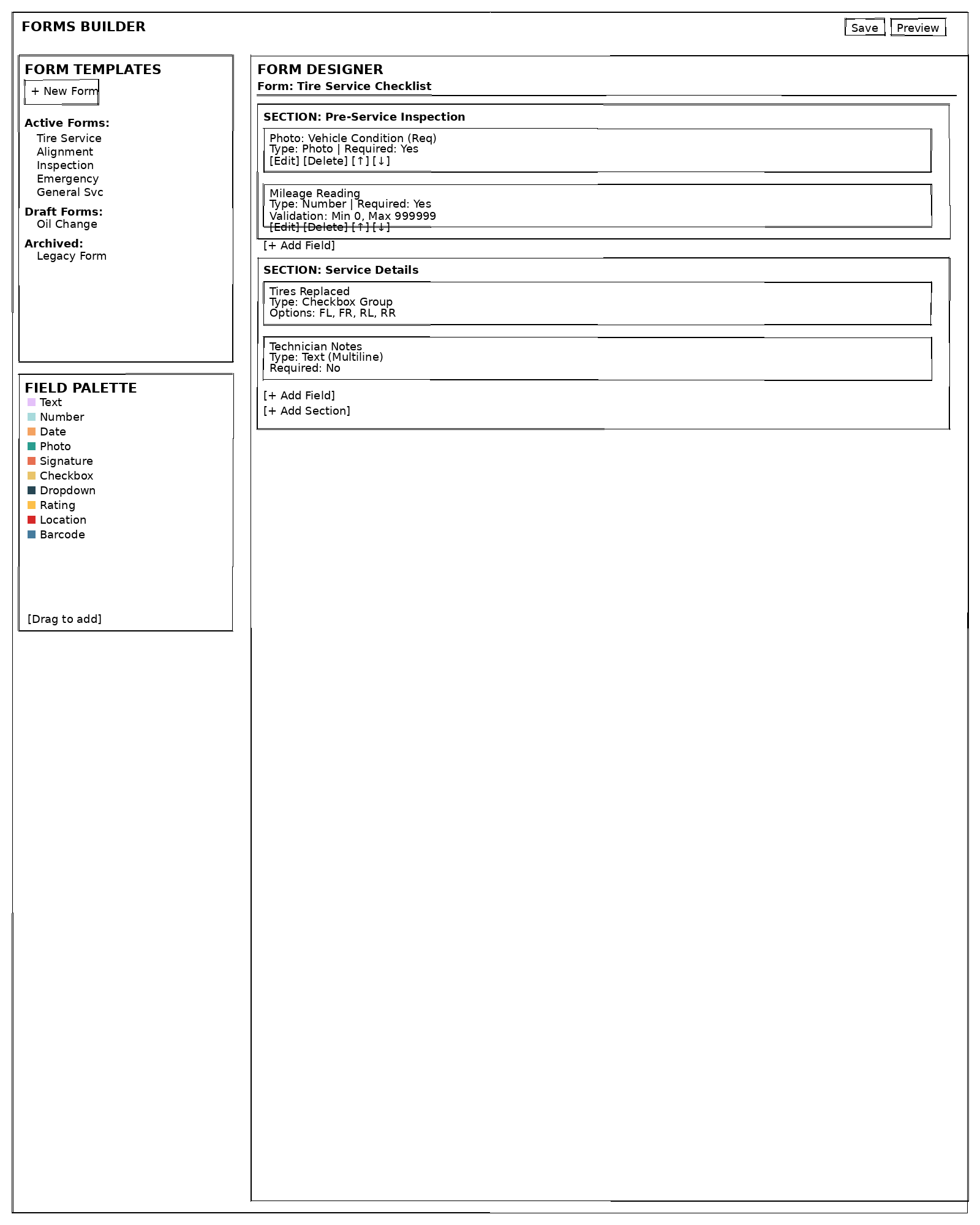
The Forms Builder provides a visual interface for creating and managing dynamic form templates used in work order documentation. It enables non-technical users to design forms with various field types, validation rules, and conditional logic without coding.
Target Users
- System Administrators - Create and manage all form templates
- Store Managers - Create store-specific form variants (with approval)
Platform & Technology
- Platform: Web Application
- Framework: Vue.js 3 with Composition API
- Form Library: FormKit (Vue.js form library)
- Language: TypeScript
- Storage: Azure SQL (JSON schema storage)
Layout Overview
Field Types
| Field Type | Description | Mobile Support | Offline |
|---|---|---|---|
| Text | Single or multi-line text input | ✅ | ✅ |
| Number | Numeric input with min/max | ✅ | ✅ |
| Date/Time | Date and/or time picker | ✅ | ✅ |
| Photo | Camera capture with multiple photos | ✅ | ✅ (queued) |
| Signature | Digital signature pad | ✅ | ✅ |
| Checkbox | Single or multiple selection | ✅ | ✅ |
| Dropdown | Select from predefined options | ✅ | ✅ |
| Rating | Star or numeric rating | ✅ | ✅ |
| Location | GPS coordinates capture | ✅ | ✅ |
| Barcode | Barcode/QR code scanner | ✅ | ✅ |
| Calculated | Auto-calculated from other fields | ✅ | ✅ |
Form Schema Structure
interface FormTemplate {
  id: string;
  name: string;
  version: number;
  status: 'draft' | 'active' | 'archived';
  serviceTypes: string[];  // Which service types use this form
  sections: FormSection[];
  createdBy: string;
  createdAt: Date;
  modifiedBy?: string;
  modifiedAt?: Date;
}

interface FormSection {
  id: string;
  title: string;
  order: number;
  fields: FormField[];
  conditions?: ConditionalRule[];  // Show/hide section
}

interface FormField {
  id: string;
  type: FieldType;
  label: string;
  helpText?: string;
  required: boolean;
  order: number;
  validation?: FieldValidation;
  options?: SelectOption[];  // For dropdowns, checkboxes
  conditions?: ConditionalRule[];  // Show/hide field
  defaultValue?: any;
}

interface ConditionalRule {
  dependsOn: string;  // Field ID
  operator: 'equals' | 'notEquals' | 'contains' | 'greaterThan' | 'lessThan';
  value: any;
  action: 'show' | 'hide' | 'require';
}

interface FieldValidation {
  minLength?: number;
  maxLength?: number;
  min?: number;
  max?: number;
  pattern?: string;  // Regex
  customMessage?: string;
}
Key Actions
| Action | Description | Required Permission |
|---|---|---|
| Create Form | Design new form template | forms.create |
| Edit Form | Modify existing template | forms.update |
| Publish Form | Activate form for use | forms.publish |
| Archive Form | Retire form from active use | forms.archive |
| Clone Form | Create copy of existing form | forms.create |
| Preview Form | Test form before publishing | forms.view |
| Export Form | Export form definition | forms.export |
Vue.js Component Structure
src/views/forms/
├── FormsBuilderView.vue            # Main view container
├── components/
│   ├── FormTemplateList.vue        # Template list sidebar
│   ├── FormDesigner.vue            # Main designer canvas
│   ├── FormSection.vue             # Section container
│   ├── FormField.vue               # Field component
│   ├── FieldPalette.vue            # Draggable field types
│   ├── FieldEditor.vue             # Field property editor
│   ├── ConditionalEditor.vue       # Conditional logic editor
│   ├── ValidationEditor.vue        # Validation rule editor
│   ├── FormPreview.vue             # Form preview modal
│   └── FormSettings.vue            # Form metadata editor
├── composables/
│   ├── useFormBuilder.ts           # Form builder state
│   ├── useFormFields.ts            # Field management
│   ├── useDragDrop.ts              # Drag and drop logic
│   └── useFormValidation.ts        # Schema validation
└── types/
    └── form.types.ts               # TypeScript interfaces
Mobile Form Rendering (React Native)
// Dynamic form renderer for mobile
import { FormField } from './types';

function DynamicFormField({ field, value, onChange }: Props) {
  switch (field.type) {
    case 'text':
      return <TextInput value={value} onChangeText={onChange} />;
    case 'number':
      return <NumericInput value={value} onChange={onChange} />;
    case 'photo':
      return <PhotoCapture value={value} onChange={onChange} />;
    case 'signature':
      return <SignaturePad value={value} onChange={onChange} />;
    case 'dropdown':
      return <Picker options={field.options} value={value} onChange={onChange} />;
    case 'barcode':
      return <BarcodeScanner value={value} onChange={onChange} />;
    default:
      return null;
  }
}
Related Documentation
- ROLES.md - Role definitions and permissions
- DISPATCH_ALERTS.md - Alert system documentation
- INTEGRATION_ARCHITECTURE.md - Data source integrations
- TECHNOLOGY_STACK.md - Technology decisions and component mapping
- VUEJS_BEST_PRACTICES.md - Vue.js development standards
- DEVELOPMENT_GUIDELINES.md - General development guidelines
Document Version: 1.1
Last Updated: January 2026
Next Review: April 2026